

Forecast and weather
Solar forecasts from Solcast or Open-Meteo, and the weather.
Virtual Battery
A battery charge Epilykos works out itself, for inverters that cannot read the battery directly.
Prices and savings
Grid, generator and battery costs, and how your savings are worked out.
Settings → Forecast and weather sets up the forecast of how much your panels will produce, along with the weather for where you are. Switch on Show the solar forecast to start.
Location
Enter your Latitude and Longitude, or press Use my location to let your browser fill them in.
Panels
If you have groups of panels that differ in size, tilt or direction (an east roof and a west roof, for example), add each group as its own array. The forecast works each one out and adds them together.
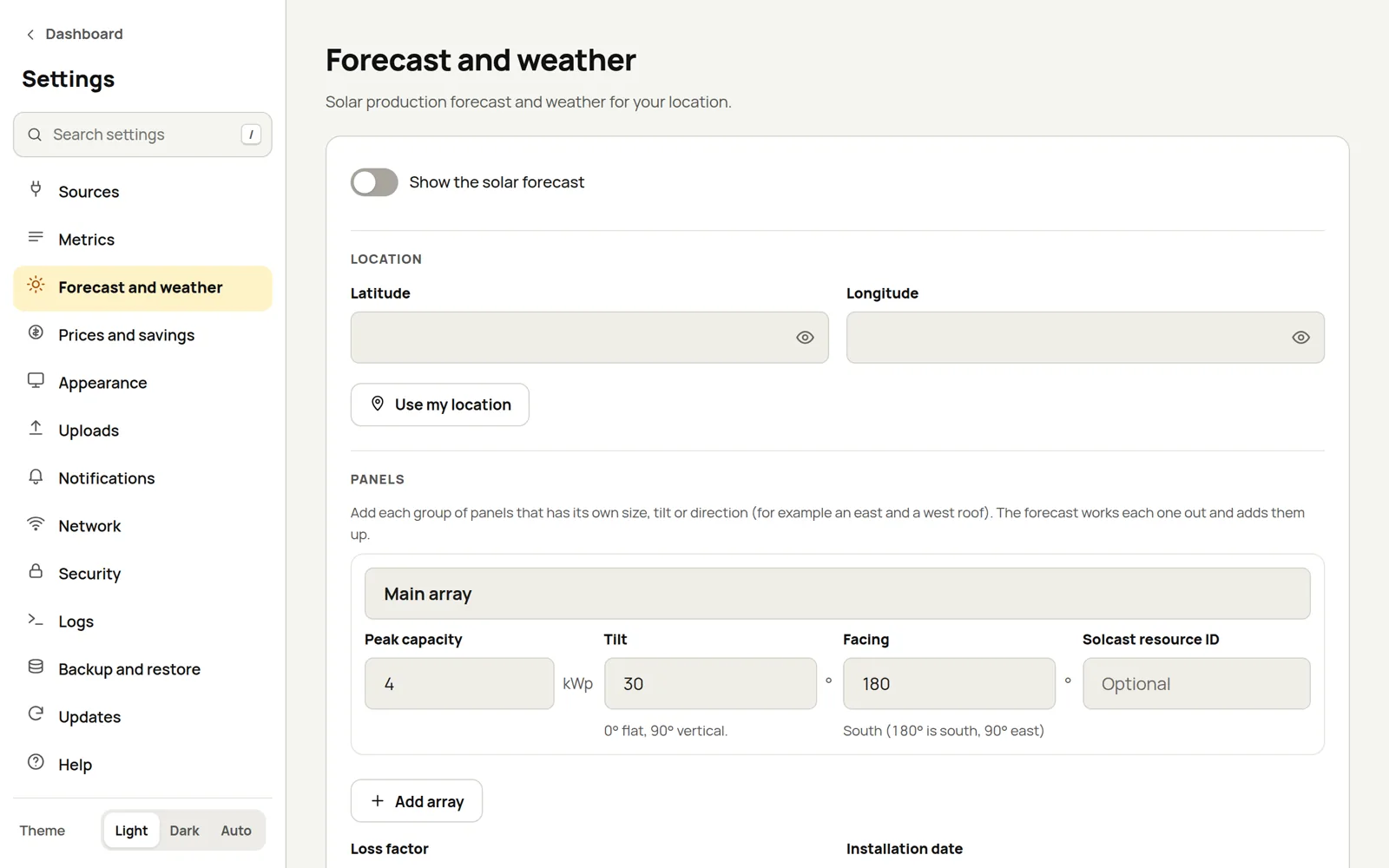
For each array, enter:
| Field | What to enter |
|---|---|
| Array name | Anything that helps you tell them apart, such as "East roof". |
| Peak capacity | The array's size in kWp. |
| Tilt | The angle in degrees: 0 is flat, 90 is upright. |
| Facing | The direction the panels face, in degrees: 180 is south, 90 is east. |
| Solcast resource ID | Optional: this array's own rooftop site in Solcast. |
Loss factor is the share of their rated output your panels really deliver, from 0 to 1; 0.9 suits most systems. Installation date is optional.
Providers
| Provider | How accurate | Cost |
|---|---|---|
| Open-Meteo | Reasonable: a forecast for your general area | Free, no key needed |
| Solcast | Better: modelled for your actual rooftop | Free hobbyist plan with about 10 requests a day |
Forecast provider and Weather provider can each be set to Auto (Solcast once it's set up, otherwise Open-Meteo), Solcast or Open-Meteo.
To use Solcast, create a rooftop site in the Solcast toolkit, then enter your Solcast API key and Solcast resource ID. If one site covers all your arrays, put its ID here; otherwise give each array its own ID above. Epilykos keeps each Solcast forecast for 3 hours, which works out at about 8 requests a day and keeps you within the free plan.
Press Test forecast to check that it all works.
Solcast weather and irradiance
Along with the solar forecast, Epilykos can ask Solcast for its weather and irradiance forecast for the same days. That's one extra request each time the forecast refreshes. Turn it off with Also fetch Solcast weather and irradiance. It's on by default, and it needs a Solcast plan that includes it. If your plan doesn't, the solar forecast carries on as before and the weather request is tried again once a day.
What you get, for every half hour:
- Sun: global, direct and diffuse irradiance (GHI, DNI, DHI) and tilted irradiance (GTI), each with a low and high estimate, and the same for a clear sky.
- Sky: cloud cover (with a low and high estimate), sun height and direction, and ground reflectivity.
- Air: temperature (with the day's low and high), dew point, humidity, pressure and the water in the air.
- Wind: speed at 10 m and 100 m, direction at both heights, and gusts.
- Rain and snow: rain rate, snowfall rate, snow depth, snow water content, and how much snow is on the panels and the ground.
- Other: storm energy (CAPE), a weather type and air quality (PM2.5 and PM10).
Where it shows up:
- The weather card uses Solcast's own temperature, humidity, wind, gusts, cloud, rain, pressure and irradiance for now, and lists direct and diffuse sun, dew point, water in the air, snow depth, storm energy and air quality when Solcast sent them.
- Each of the next days in the forecast also gets its lowest and highest temperature, rain total, strongest wind and gust, average cloud, irradiance total and snowfall.
- Every value for the current half hour is also kept as a metric named solcast_ followed by the value
(for example
solcast_ghi,solcast_air_temp,solcast_wind_gust,solcast_pv_estimate). Use them on any card, in a chart, a notification or a combined metric.
Requests per day
Solcast requests per day is what your plan allows each UTC day: 10 for a hobbyist account. Every request Epilykos makes to Solcast is counted. The solar forecast refreshes every 3 hours and always comes first. The weather request is made only when the day's allowance leaves room for the forecasts still due, so on a 10-request plan you get the weather a couple of times a day and the forecast is never starved. A larger plan gets the weather with every refresh.
When the forecast isn't available
If Solcast's daily allowance runs out, or a provider can't be reached, Epilykos raises the Solar forecast unavailable event. You can choose to be told about it in Notifications.
Where the forecast shows up
You'll see it on the forecast and weather cards, in Day
totals and Energy day, in the Telegram /forecast command, and in scheduled forecast reports
such as a "low solar tomorrow" warning.
Last updated on